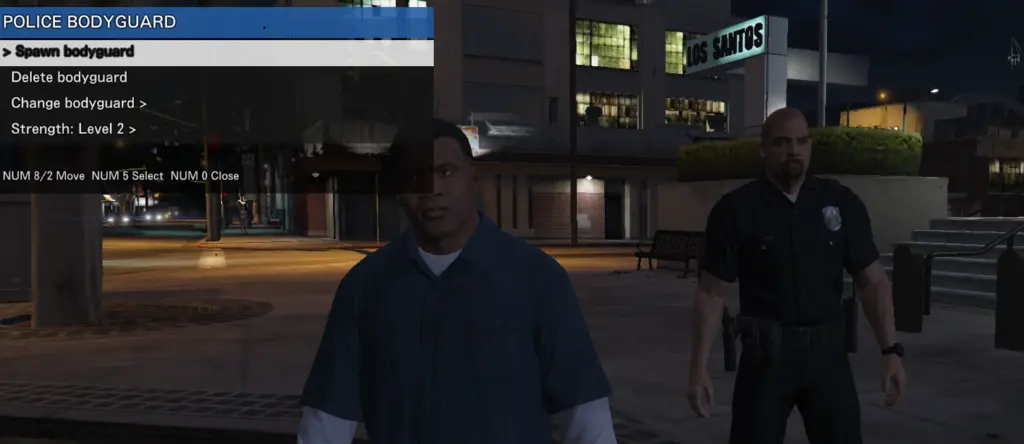
Police Bodyguard Mod is a GTA V PC single-player ScriptHookVDotNet v3 mod that lets you spawn a personal bodyguard. The bodyguard follows the player, protects the player, and can fight hostile NPCs or NPCs that are attacking the player.
Note: I forgot to mention that this mod was tested with ScriptHookVDotNet v3.7.0-nightly.153. If the mod does not load, please check your ScriptHookVDotNet version.
The mod includes an in-game bodyguard menu that can be opened with F6. The menu UI is made for this mod and is drawn by the mod itself.
Controls
– F5: Spawn bodyguard
– F6: Open bodyguard menu
Menu Features
– Spawn bodyguard
– Delete bodyguard
– Change bodyguard appearance
– Police appearance
– Merryweather appearance
– Adjust bodyguard strength level
Bugs and Features
Features:
– Personal bodyguard spawn
– Bodyguard follow behavior
– Combat support against hostile NPCs
– Police and Merryweather appearance options
– Strength level selection
– Single-player only
Known bugs / notes:
– Bodyguard behavior may vary during some story missions because mission NPCs use special AI.
– ScriptHookVDotNet version mismatches can prevent the mod from loading.
– If F5 or F6 does nothing, check ScriptHookVDotNet.log in your GTA V folder.
Requirements
– GTA V for PC
– ScriptHookV
– ScriptHookVDotNet v3
Installation Overview
1. Install ScriptHookV.
2. Install ScriptHookVDotNet v3.
3. Open your main GTA V folder.
4. Create a folder named scripts if it does not already exist.
5. Copy PoliceBodyguard.dll into the scripts folder.
Install path example:
Grand Theft Auto V > scripts > PoliceBodyguard.dll
Important
This mod is for GTA V single-player only.
Do not use this mod in GTA Online.
Using mods in GTA Online may result in a ban.
Credits and Reuse Permission
Created as a GTA V single-player ScriptHookVDotNet v3 bodyguard mod.
The in-game menu UI text and behavior were created for this mod.
No Menyoo UI code, Native Trainer UI code, or other mod menu code is included.
Credits:
koguma
Download mod
| File | File size |
|---|---|
 PoliceBodyguardMod_install_only_latest_20260606_004419
 | 19 KB |