![Super Punch [.NET] 1.0](https://gta5mod.net/wp-content/uploads/2019/12/c41e7e-11111111-1024x578.jpg)
![Super Punch [.NET] 1.0](https://gta5mod.net/wp-content/uploads/2019/12/d286bd-Image8.jpg)
![Super Punch [.NET] 1.0](https://gta5mod.net/wp-content/uploads/2019/12/64b917-3.jpg)
![Super Punch [.NET] 1.0](https://gta5mod.net/wp-content/uploads/2019/12/64b917-2.jpg)
![Super Punch [.NET] 1.0](https://gta5mod.net/wp-content/uploads/2019/12/bd9b0b-super-punch-thumb2.jpg)
![Super Punch [.NET] 1.0](https://gta5mod.net/wp-content/uploads/2019/12/bd9b0b-super-punch-thumb.jpg)
Install instructions are below. Please read them thoroughly and pay close attention to the directions. The mod may not work if you are missing something or skip a step.
==========[ Description ]==========
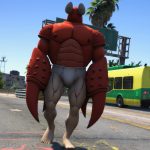
Super Punch adds gratuitous force to all melee attacks with the option to increase or decrease the gratuitousness of the force. Send people and cars flying!
==========[ NOT FOR GTAO ]==========
Using certain mods in GTA Online could net you a ban, so don’t do it! Keep mods like this in single player only.
==========[ Mod Features ]==========
Increased force on all unarmed and armed melee attacks.
Mod menu for easy toggling of features and adjusting values.
Send people and cars flying!
PHYSICS! 😀
ACTIVATE HULK MODE!
Mod Menu (on the numpad):
Toggle menu: ” . ”
Move up: ” 8 ”
Move down: ” 2 ”
Select: ” 5 ”
Return to main menu: ” 4 ”
Close: ” 0 ”
Hotkey for ability:
Emergency brake: ” E ”
Running is the same as my Unstoppable Force mod, it works like drifting a car. Force is applied in the direction you are looking, tap the ebrake to slow down and regain control. Works in air too. You can modify how much stopping force the brake has by changing the variable “E.Brake Mod”. Higher values = less force (10 being almost nothing), lower values = more force (1 is instant stop).
Changelog:
In the interest of space I’m omitting everything prior to 0.7.
====[ 1.0 ]
Added Mod menus
Added option to toggle abilities
Added new features Fast Run, Super Jump, God Mode and an E.Brake
God Mode works independent of the mod being toggled on. Good for a quick invincibility.
NEW variable “E.Brake Mod” that increases or decreases the e.brake force. Higher values = less force (10 being almost nothing), lower values = more force (1 is instant stop)
NEW variable “Jump Force”, increase to go higher, decrease to go lower
NEW variable “Impact Force”, increase to apply more force with melee, decrease to apply less
NEW variable “Run Speed Mod”, increase to run faster, decrease to run slower
Small fixes here and there to improve responsiveness
Fixed a bunch of other stuff 😛
====[ 0.91 ]
Uploaded .cs version of script, should fix many instances of the mod not working
Physics should now work 100% of the time :O
Force adjustments now alter force properly
Improved synchronization of PED and vehicle forces, they will now travel relative distances rather than absurd distances 😛
====[ 0.9 ]
Upgraded to .NET Scripthook 😀
Brought vehicle and ped forces closer together… sort of… cars just like to go fast lol
Improved responsiveness of script
Greatly increased memory efficiency from the LUA version
Peds now fly slightly upwards when hit and travel farther
Force adjustment now functions correctly, but at high values the mod stops working. It has to do with how force is calculated, just bring it back down and the mod will work again
Improved text display methods and positioning
Fixed mod toggle not working correctly
Fixed a bunch of minor issues related to the script itself
====[ 0.7 ]
Memory problems have finally been fixed, no more crashing 😀
Now works on all custom PEDs
Improved physics application slightly
Fixed mod toggle not working
Improved responsiveness of script
==========[ Install Instructions ]==========
Read this section thoroughly. If you miss something the mod may not work.
Read this section thoroughly. If you miss something the mod may not work. Do not skip over anything.
Super Punch uses the Community Script Hook V .NET by Crosire. Download it from here:
Community Script Hook V .NET
You will also need the original scripthook to run the .net one. Download that if you haven’t already here (It comes with NativeTrainer, that is optional. You don’t need it for my mod to work):
Script Hook V + Native Trainer
Once you have installed BOTH scripthooks successfully, copy Super Punch.cs to the scripts folder in your GTA V directory. For example, if you have steam it could be something like:
C:\Steam\steamapps\common\Grand Theft Auto V\scripts\
Note: If the scripts folder does not exist after you’ve installed both scripthooks, you can manually create it. Right click in your GTA V directory, select new folder, name it scripts.
That’s it, you’re done 😀 The only thing left to do now is FALCON SMASH HULK PUNCH!
==========[ Credits ]==========
Mod by Shenaniganizer.
Download mod
| File | File size |
|---|---|
 Super Punch .NET v1.00
 | 3 KB |
![Hoodie OPPAI (One Punch Man, Saitama) for Franklin, Trevor or Michael. [2K] 1.0](https://gta5mod.net/wp-content/uploads/2022/04/Hoodie-OPPAI-150x150.png "Hoodie OPPAI (One Punch Man, Saitama) for Franklin, Trevor or Michael. [2K] 1.0")
![Boros One Punch Man [Add-On Ped / FiveM]](https://gta5mod.net/wp-content/uploads/2022/07/Boros-One-Punch-Man-150x150.jpg "Boros One Punch Man [Add-On Ped / FiveM]")
![Genos One Punch Man [Add-On Ped/ FiveM] V1.0](https://gta5mod.net/wp-content/uploads/2022/12/Genos-One-Punch-Man-150x150.png "Genos One Punch Man [Add-On Ped/ FiveM] V1.0")