
![Industrial Loft [Menyoo] V1.2](https://gta5mod.net/wp-content/uploads/2023/07/Industrial-Loft5-1024x640.webp)
![Industrial Loft [Menyoo] V1.2](https://gta5mod.net/wp-content/uploads/2023/07/Industrial-Loft.webp)
![Industrial Loft [Menyoo] V1.2](https://gta5mod.net/wp-content/uploads/2023/07/Industrial-Loft2.webp)
![Industrial Loft [Menyoo] V1.2](https://gta5mod.net/wp-content/uploads/2023/07/Industrial-Loft3.webp)
![Industrial Loft [Menyoo] V1.2](https://gta5mod.net/wp-content/uploads/2023/07/Industrial-Loft4.webp)
![Industrial Loft [Menyoo] V1.2](https://gta5mod.net/wp-content/uploads/2023/07/Industrial-Loft5.webp)
This is a very very simple “Menyoo” spawner mod.
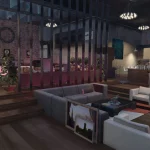
A design of an Industrial Loft. Not much to say.
INSTALLATION
1. Place the “Industrial Loft.xml” file into:
…Grand Theft Auto V\menyooStuff\Spooner
2. Use OpenIV to place the “dlc_patch” folder into:
…Grand Theft Auto V\mods\update\update.rpf
to prevent map objects from re-appearing when you get to a certain distance.
-Optional-
(MapEditor required from this point)
3. Menyoo can be problematic sometimes when it comes to teleport markers.
If the teleport markers are not teleporting you, place “IndustrialLoftAutoTeleport (MapEditor).xml” file into:
…Grand Theft Auto V\scripts\AutoloadMaps folder (create one if it doesn’t exist)
to use MapEditor teleport markers instead.
4. Use “Industrial Loft – NoTP” to place objects so that Menyoo won’t spawn problematic markers.
Changelog:
01/01/2020 Update:
Minimal changes in living room, in bedroom, on dining table, new alarm systems etc.
15/07/2023 Update:
Object will NOT re-appear again when you get far from the loft.
A music player added!
To use the music player, go the left side of the TV unit and press “F” to get in and turn on the music player.
11/21/2026 Update:
Updated for the latest game version.
Credits:
The Majestic Noob
Download mod
| File | File size |
|---|---|
 Industrial Loft
 | 4 MB |


![Baley Loft [ ADD-ON / YMAP ] 1.1](https://gta5mod.net/wp-content/uploads/2020/05/Baley-Loft-150x150.jpg "Baley Loft [ ADD-ON / YMAP ] 1.2")
