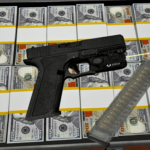
![Glock 17 Gen 4 [Animated] V1.0](https://gta5mod.net/wp-content/uploads/2024/06/Glock-17-Gen-4-1-1024x576.png)
![Glock 17 Gen 4 [Animated] V1.0](https://gta5mod.net/wp-content/uploads/2024/06/Glock-17-Gen-42.webp)
![Glock 17 Gen 4 [Animated] V1.0](https://gta5mod.net/wp-content/uploads/2024/06/Glock-17-Gen-43.webp)
![Glock 17 Gen 4 [Animated] V1.0](https://gta5mod.net/wp-content/uploads/2024/06/Glock-17-Gen-44.webp)
![Glock 17 Gen 4 [Animated] V1.0](https://gta5mod.net/wp-content/uploads/2024/06/Glock-17-Gen-45.webp)
![Glock 17 Gen 4 [Animated] V1.0](https://gta5mod.net/wp-content/uploads/2024/06/Glock-17-Gen-46.png)
Features:
2K textures
Correct hand placement
Animated
Collisions work
HQ Models
Replaces combatpistol
Installation [FiveM_Replace]:
Drag and drop the “G17G4” folder somewhere in your folder hierarchy on your server and now go to the server.cfg and add a new line called “ensure G17G4”.
Ingame you can spawn your weapon with the name “weapon_combatpistol”.
I recommend to use a command to give you the weapon or vMenu
Installation Single Player:
Place the weapon files in
update\x64\dlcpacks\patchday8ng\dlc.rpf\x64\models\cdimages\weapons.rpf
Credits:
DomaX
Download mod
| File | File size |
|---|---|
 G17Gen4
 | 47 MB |
![Glock 17 Gen 5 [Animated] 1.2](https://gta5mod.net/wp-content/uploads/2021/07/Glock-17-Gen-5-150x150.jpg "Glock 17 Gen 5 [Animated] 1.2")
![Glock 22 Gen 4 [Animated] 1.0](https://gta5mod.net/wp-content/uploads/2021/07/Glock-22-Gen-4-150x150.jpg "Glock 22 Gen 4 [Animated] 1.1")
![Glock 17 Gen 4 [Animated] V2.0](https://gta5mod.net/wp-content/uploads/2024/06/Glock-17-Gen-4-150x150.png "Glock 17 Gen 4 [Animated] V2.0")
![Glock 19 Gen 5 With Switch & ETS Mag [Replace / Animated] V1.0](https://gta5mod.net/wp-content/uploads/2024/10/Glock-19-Gen-5-With-Switch-150x150.png "Glock 19 Gen 5 With Switch & ETS Mag [Replace / Animated] V2.0")