
![Taj Mahal Prop [AddonProps \ Map editor] V1.0](https://gta5mod.net/wp-content/uploads/2024/12/Taj-Mahal-Prop-1024x576.png)
![Taj Mahal Prop [AddonProps \ Map editor] V1.0](https://gta5mod.net/wp-content/uploads/2024/12/Taj-Mahal-Prop6.webp)
![Taj Mahal Prop [AddonProps \ Map editor] V1.0](https://gta5mod.net/wp-content/uploads/2024/12/Taj-Mahal-Prop2.png)
![Taj Mahal Prop [AddonProps \ Map editor] V1.0](https://gta5mod.net/wp-content/uploads/2024/12/Taj-Mahal-Prop3.png)
![Taj Mahal Prop [AddonProps \ Map editor] V1.0](https://gta5mod.net/wp-content/uploads/2024/12/Taj-Mahal-Prop5.png)
![Taj Mahal Prop [AddonProps \ Map editor] V1.0](https://gta5mod.net/wp-content/uploads/2024/12/Taj-Mahal-Prop4.png)
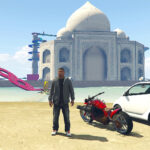
Tag mahal prop its historical Indian architecture and this is my first map mod.
Requirements
Map Editor by Guadmaz
AddonProps by Meth0d & Quechus13
Install
AddonProps part:
1-after install AddonProps correctly put [tajmahal.ydr and tajmahal.ytd] in Grand Theft Auto V\update\x64\dlcpacks\addonprops\dlc.rpf\props.rpf
2- open Props Editor software Props Tab -> Add Prop (JSON) Paste the code: {“PropName”:”tajmahal”,”TextDict”:”External”,”LodDist”:”2000,0″,”SpecialAttr”:”0″,”Flags”:”479685863″} Click “Add Prop” then “Rebuild” and put def_props.ytyp generated to update\x64\dlcpacks\addonprops\dlc.rpf\props.rpf
Map Editor part:
1- after install it correctly open ObjectList.ini [one of map editor files you find it in scripts folder] with notepad and add tajmahal then save .
NOW Done you can load this prop and use it for maps mods with map editor
tips: for my map mod drag tajmahal.xml to GTA directoty file and load it with map editor
have fun .
Credits:
kingfire
Download mod
| File | File size |
|---|---|
 Taj mahal
 | 820 KB |
![Basil's cathedral Prop [AddonProps / Map editor] V1.0](https://gta5mod.net/wp-content/uploads/2024/12/cathedral-Prop-150x150.png "Basil's cathedral Prop [AddonProps / Map editor] V1.0")
![AddonProps 1.1 [STABLE]](https://gta5mod.net/wp-content/uploads/2019/08/AddonProps.png "AddonProps 1.1 [STABLE]")
