
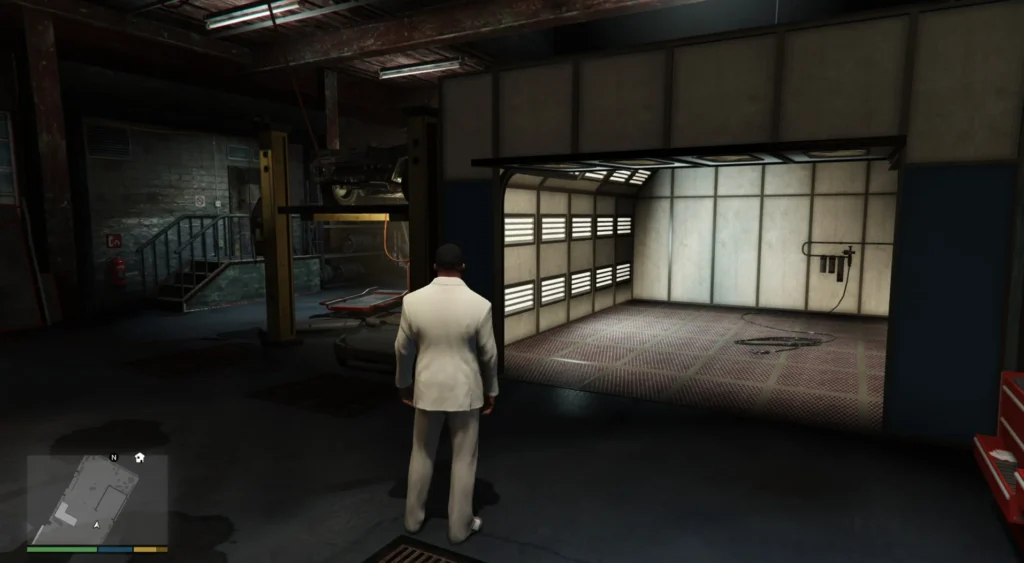
![Mega Mall Custom Garage [Addon] V1.0](https://gta5mod.net/wp-content/uploads/2025/01/Mega-Mall-Custom-Garage2.webp)
![Mega Mall Custom Garage [Addon] V1.0](https://gta5mod.net/wp-content/uploads/2025/01/Mega-Mall-Custom-Garage3.webp)
![Mega Mall Custom Garage [Addon] V1.0](https://gta5mod.net/wp-content/uploads/2025/01/Mega-Mall-Custom-Garage4.webp)
![Mega Mall Custom Garage [Addon] V1.0](https://gta5mod.net/wp-content/uploads/2025/01/Mega-Mall-Custom-Garage5.webp)
Installation:
PLEASE READ IT CAREFULLY !
Download and install:
ScriptHook,
ScriptHook V.NET
OpenIV
MENYOO
1 and very important dont forget Map Builder for some walls and grounds.
2 and Panda Craft Mods
3 and DNX Generic Add-On Props
HOW TO INSTAL:
ADDON [Ymap][Ybn][Ydr] for the Mega Mall Custom Garage.
Installation for instal (OPEN IV needed for this)
1] Copy and paste the dlc folder “mall custom garage”
To: mods>update>x64>dlcpacks
2] Finally add “dlcpacks:/mall custom garage/” in dlclist.xml using OpenIV
To: mods >update.rpf >common >data>dlclist
3]With Menyoo for peds.
Copy:
Mall garage peds.xml
of my archive to GTAV menyooStuff Spooner.
Now launch in GTA5,
press F8 to open Menyoo, select “ObjectSpooner”, “SavedFiles”,
and load:
Mall garage peds.xml
Good game 🙂
Credits:
zamalone
Download mod
| File | File size |
|---|---|
 Mega mall Custom Garage
 | 2 MB |
![Work in garage 1.0 [menyoo] Addon for Port Garage By "ToniBabelony" 1.0](https://gta5mod.net/wp-content/uploads/2021/05/garage-150x150.jpg "Work in garage 1.0 [menyoo] Addon for Port Garage By \"ToniBabelony\" 1.0")
![[MLO] Vespucci Mall Fleeca Bank [alt:V / RageMP / Add-On SP] 1.0](https://gta5mod.net/wp-content/uploads/2021/06/Vespucci-Mall-Fleeca-Bank.webp "[MLO] Vespucci Mall Fleeca Bank [alt:V / RageMP / Add-On SP] 1.0")
![Franklin Mega Garage [YMAP | Menyoo] Version 3](https://gta5mod.net/wp-content/uploads/2020/03/Franklin-Mega-Garage-150x150.jpg "Franklin Mega Garage [YMAP | Menyoo] Version 3")
