![Despicable Me 3 Villain Car [Add-On | VehFuncs V] V1.0](https://gta5mod.net/wp-content/uploads/2023/08/despicable-Me-3-Villain-Car-4.webp)
![Despicable Me 3 Villain Car [Add-On | VehFuncs V] V1.0](https://gta5mod.net/wp-content/uploads/2023/08/despicable-Me-3-Villain-Car.webp)
![Despicable Me 3 Villain Car [Add-On | VehFuncs V] V1.0](https://gta5mod.net/wp-content/uploads/2023/08/despicable-Me-3-Villain-Car-2.webp)
![Despicable Me 3 Villain Car [Add-On | VehFuncs V] V1.0](https://gta5mod.net/wp-content/uploads/2023/08/despicable-Me-3-Villain-Car-3.webp)
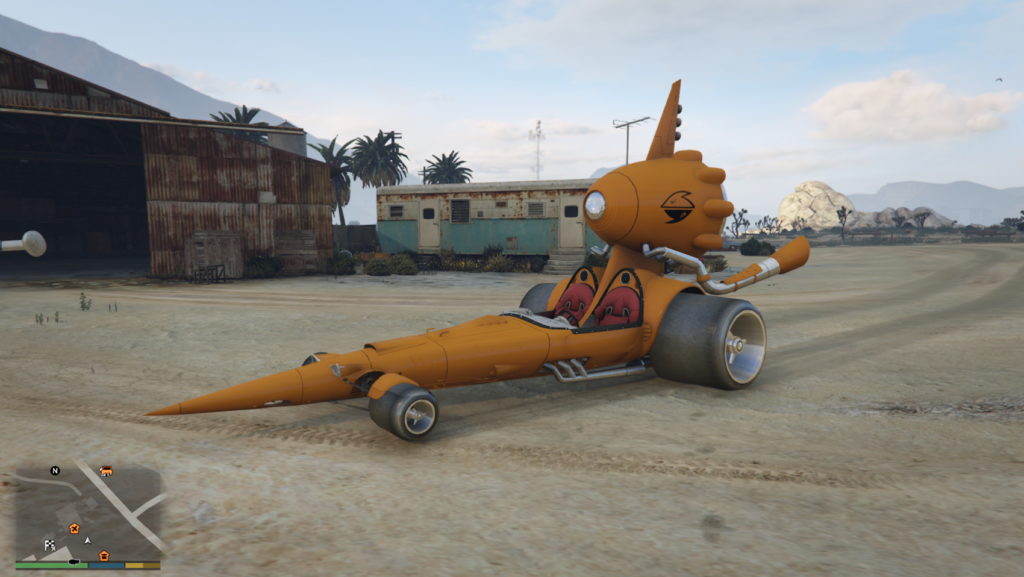
Hands on steering
Paintable body colour
Guns and Rockets
Working dials and lights
Rocket boost
Rotating engine via VehfuncsV
despicable me 3 Villain Car
Install instructions
First, go to gta5 / mods / update / x64 / dlcpacks
Make a new folder, name it “dm3villaincar”, and drag dlc.rpf into the folder.
Then, go to gta5 / mods / update / update.rpf / common / data
Edit dlclist.xml, add “dlcpacks:/dm3villaincar/”
spawn name dm3villaincar
vehfuncs features – engine rotation – Place the dm3villaincar.ini file in to your vehfuncs folder
Credits:
converted by kjb33
Download mod
| File | File size |
|---|---|
 dm3villaincar
 | 4 MB |
![1969 Dodge Charger [Add-On | VehFuncs V | Car Pack] V1.1](https://gta5mod.net/wp-content/uploads/2025/04/1969-Dodge-Charger-150x150.webp "1969 Dodge Charger [Add-On | VehFuncs V | Car Pack] V1.1")