
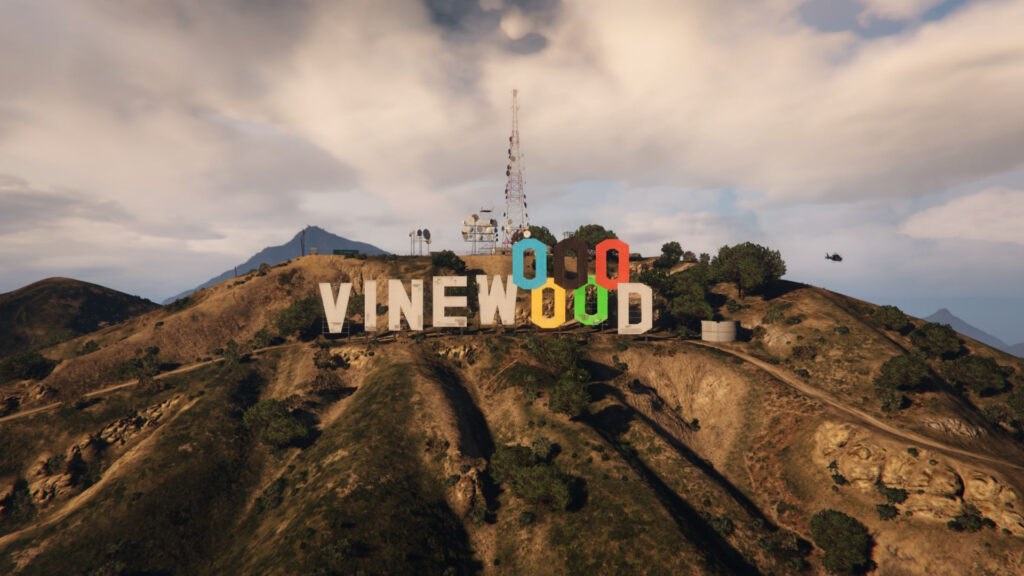


Transforming Vinewood panels into 2028 Olympic Vinewood panels
Installation:
Main file (“Manual installation”)
– Use OpenIV to install and activate “Edit Mode”.
– Go to Grand Theft Auto V\mods\update\x64\dlcpacks and add the file “vinewood_jo_tgp”.
– Then go to Grand Theft Auto V\update.rpf\common\data and edit the “dlclist.xml” file.
– In “dlclist.xml”, insert dlcpacks:/vinewood_jo_tgp/ at the bottom of the page (before “”) and save.
v1.2.1 v1.2Changelog:
– Direct download on GTA5mod (also available on TGP-Launcher)
– Various bug fixes
– Fix Bug
V1.1
– Smaller file
– Compatible with HOLLYWOOD panels
– Add collision
– Fix LOD
Credits:
TyNox Games P
Download mod
| File | File size |
|---|---|
 VINEWOOD JO 2028 v1.2.1
 | 835 KB |
![Ontario sign replaces Vinewood sign [FIVEM/SP] 1.0](https://gta5mod.net/wp-content/uploads/2022/09/Ontario-sign-replaces-Vinewood-sign-150x150.png "Ontario sign replaces Vinewood sign [FIVEM/SP] 1.0")
![Youtube Logo Vinewood Sign [Add-On] 1.0](https://gta5mod.net/wp-content/uploads/2022/04/Youtube-Logo-Vinewood-Sign-150x150.webp "Youtube Logo Vinewood Sign [Add-On] 1.0")
![FAR FAR AWAY Vinewood Sign [Add-On] 1.0](https://gta5mod.net/wp-content/uploads/2022/08/FAR-FAR-AWAY-Vinewood-Sign-150x150.webp "FAR FAR AWAY Vinewood Sign [Add-On] 1.0")
