
Requirements
– Menyoo Mod Menu/Object Spooner
– OpenIV
To install the mod you just have to replace the files in :
mods/update/x64/dlcpacks/mpstunt/dlc.rpf/x64/levels/gta5/props/mp_stunt_hoardings.rpf
by the files wich are in the mods 1 folder.
Replace the files in :
mods/update/x64/dlcpacks/mpsum/dlc.rpf/x64/levels/gta5/props/prop_sum_track_hoardings.rpf
by the files wich are in the mods 2 folder.
Replace the files in :
mods/update/x64/dlcpacks/mpheist/dlc.rpf/x64/levels/gta5/props/prop_ch_arcade_race.rpf
by the files wich are in the mods 3 folder.
If you want to uninstall the mod, you just have to replace the files modified by the original files which are in the “original” folders.
Changelog:
1.1 version :
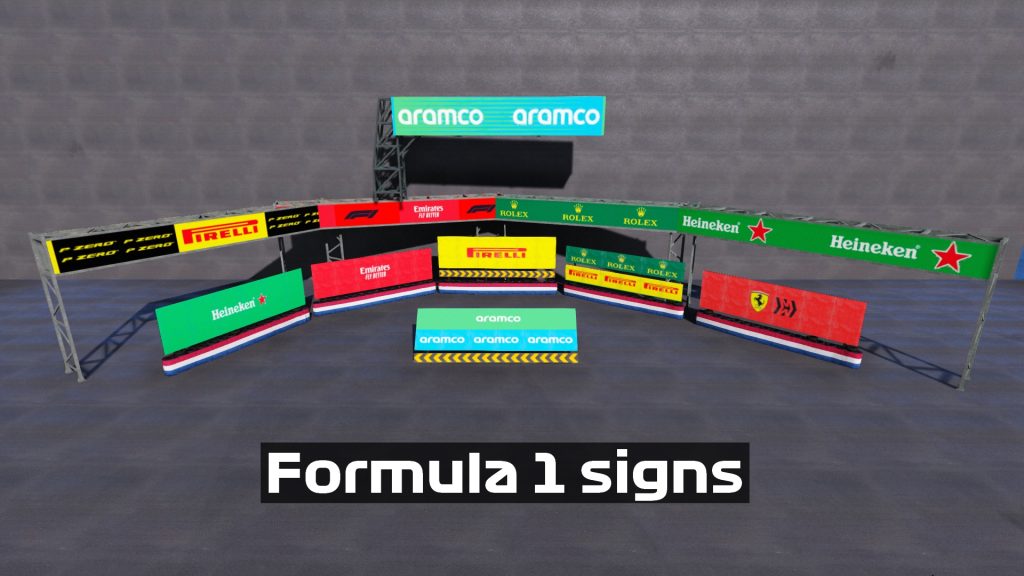
– 6 new current signs in f1
Credits:
sofgaming
Download mod
| File | File size |
|---|---|
 F1 sign
 | 4 MB |

![Signs beach [SP / FiveM] 1.0](https://gta5mod.net/wp-content/uploads/2021/02/Signs-beach-150x150.jpg "Signs beach [SP / FiveM] 1.0")
![Blaine County Traffic Lights & Signs [YMAP] 2.0](https://gta5mod.net/wp-content/uploads/2022/03/Blaine-County-Traffic-Lights-150x150.webp "Blaine County Traffic Lights & Signs [YMAP] 2.1")
![Deutsche Verkehrsschilder / German Traffic Signs [OIV] [BETA] 0.4](https://gta5mod.net/wp-content/uploads/2021/11/German-Traffic-Signs-150x150.webp "Deutsche Verkehrsschilder / German Traffic Signs [OIV] [BETA] 0.4")
