
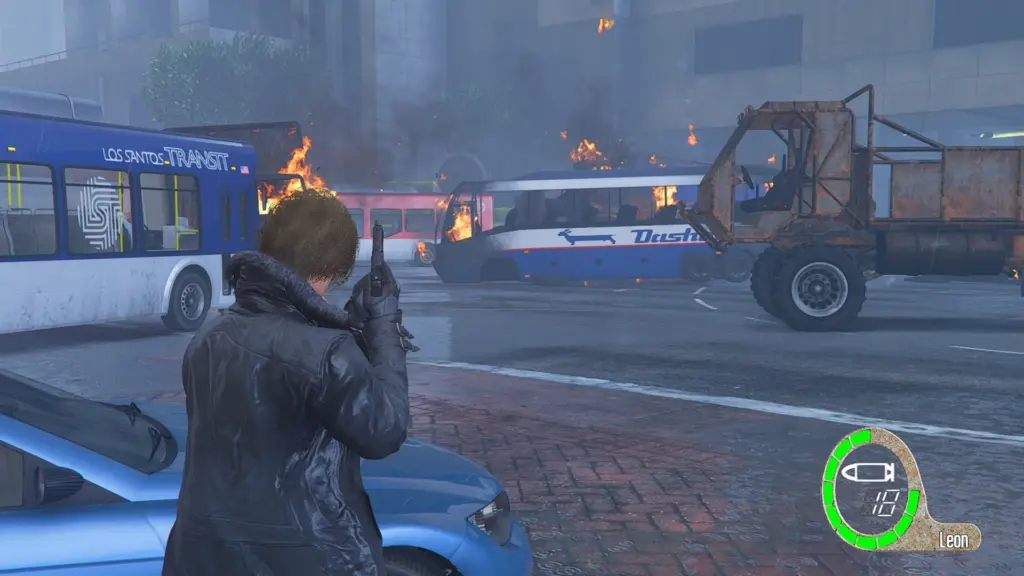


Bring the classic survival horror aesthetic to Los Santos! This mod adds a fully functional, dynamic Resident Evil 4 interface. It tracks your health, current weapon, and ammo in real-time.
Requirements
Before installing, ensure you have the following tools set up in your GTA V directory:
Script Hook V
Script Hook V Dot Net
OpenIV
Installation Guide
1. Installing the Script
Extract the downloaded mod archive.
Locate the RE4_HUD.cs (or .dll if you compiled it) file.
Drag and drop this file into the scripts folder located in your main Grand Theft Auto V directory.
(Note: If you don’t have a scripts folder, simply create a new folder and name it scripts).
2. Installing the Textures (.ytd)
Open OpenIV and enable “Edit mode”.
Navigate to the following path inside your mods folder:
mods \ update \ update.rpf \ x64 \ textures \ script_txds.rpf
(Note: If you don’t see this path, navigate to the original update.rpf outside the mods folder and click “Copy to mods folder”).
Drag and drop the re4_hud.ytd file into the script_txds.rpf archive.
Close OpenIV.
Features
Dynamic Health Bar: The circular health indicator changes based on your actual player health.
Weapon Mapping: Custom weapon icons for Pistols, Shotguns, Assault Rifles, Snipers, Heavy Weapons, and Explosives.
Real-Time Ammo: Digital ammo counter that updates accurately as you shoot and reload.
Classic Aesthetic: “Leon” character name fixed on the HUD to maintain a visual fidelity to the original game.
Troubleshooting
If the HUD is not showing up, press Insert to reload your SHVDN scripts.
Ensure that the .ytd file was placed in the exact path mentioned above, otherwise, the script will not be able to load the textures and the HUD will remain invisible.
Credits:
HermanDude
Download mod
| File | File size |
|---|---|
 RESIDENT EVIL 4 HUD MOD
 | 3 MB |
![Resident Evil "Elephant Killer" Revolver [Animated]](https://gta5mod.net/wp-content/uploads/2019/10/063713-main2.jpg "Resident Evil \"Elephant Killer\" Revolver [Animated]")

![Ada Wong Resident Evil 2 Remake [Add-On Ped | Replace] v1.5](https://gta5mod.net/wp-content/uploads/2020/07/Ada-Wong-Resident-Evil-2-Remake-150x150.jpg "Ada Wong Resident Evil 2 Remake [Add-On Ped | Replace] v1.5")
![Resident Evil - Lone Wolf [Add-on Ped]](https://gta5mod.net/wp-content/uploads/2021/11/Resident-Evil-Lone-Wolf-150x150.webp "Resident Evil - Lone Wolf [Add-on Ped]")
