
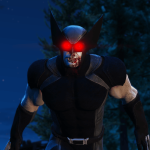
![Wolverine Fortnite [Add-On / FiveM] 1.0](https://gta5mod.net/wp-content/uploads/2022/02/Wolverine-Fortnite-1024x576.png)
Requirements: AddonPeds by Meth0d
Installation:
– Using OpenIV, put all files into GTAV>mods>update>x64>dlcpacks>addonpeds>dlc.rpf>peds.rpf
– Run AddonPeds (Run as admin)
– Click “New Ped” input the name “wolverine”
– Set Ped Type to “Male” and Is streamed “False”.
– press REBUILD.
– Done!
Credits:
> This model and textures are the property of Bandai Namco
> Model conversion by raviabhishek1
Download mod
| File | File size |
|---|---|
 wolverine fortnite[Addon][Fivem]
 | 4 MB |
![Wolverine X-Men costume [Add-On Ped] 1.0](https://gta5mod.net/wp-content/uploads/2020/09/Wolverine-X-Men-costume-150x150.jpg "Wolverine X-Men costume [Add-On Ped] 1.0")
![Wolverine (Horsemen of Apocalypse) [Add-On Ped] 1.0](https://gta5mod.net/wp-content/uploads/2020/09/Wolverine-150x150.png "Wolverine (Horsemen of Apocalypse) [Add-On Ped] 1.0")
![The Wolverine (Hugh Jackman "2013") [Add-On / Replace Ped]](https://gta5mod.net/wp-content/uploads/2021/11/The-Wolverine-150x150.png "The Wolverine (Hugh Jackman \"2013\") [Add-On / Replace Ped]")
![Wolverine Weapon X [Add-On Ped] V1.0](https://gta5mod.net/wp-content/uploads/2023/09/Wolverine-Weapon-X-150x150.jpg "Wolverine Weapon X [Add-On Ped] V1.0")
