
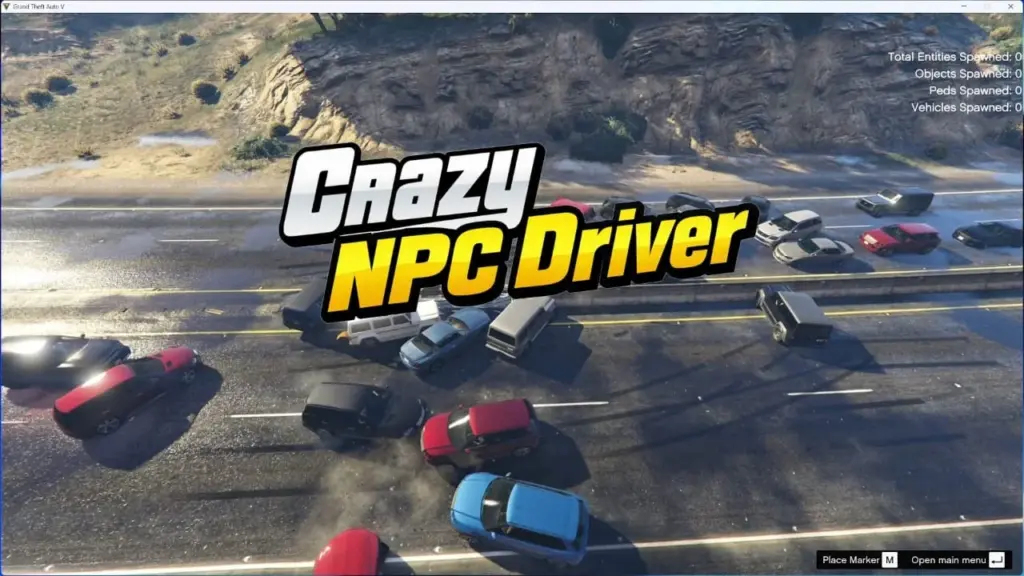


CrazyDriver turns GTA V traffic into aggressive, unpredictable chaos.
NPC drivers will drive recklessly, chase the player, ignore braking, and create absolute mayhem around you.
FEATURES
Toggle chaos on/off with a keybinding
Configurable chaos radius and update interval
5 levels of Chaos Intensity (ChaosLevel 1–5)
Runtime command system (~)
INI-based configuration + in-game command overrides
CONFIGURATION (INI)
; ================================
; CrazyDriver Configuration
; ================================
;
; ================================
; PERFORMANCE WARNING
; ================================
; – Larger Radius = higher CPU usage
; – Large Radius + small UpdateIntervalMs may cause:
; * FPS drops
; * stuttering
; * vehicles behaving oddly (collision streaming)
;
; – Using Radius above ~3000 may cause some vehicles to temporarily clip through objects.
;
; RECOMMENDED VALUES:
; Radius: 300 – 2000
; UpdateIntervalMs: 150 – 600
; ChaosLevel: 2 or 3
; ================================
[KEYS]
ToggleChaos=F7
[SETTINGS]
Radius=1250
UpdateIntervalMs=200
ChaosLevel=2
RUNTIME COMMANDS (IN-GAME)
Press ~ (tilde) to enter command mode.
Available commands:
togglecd=KEY
Change ToggleChaos key at runtime
Example: togglecd=K
radiuscd=VALUE
Change chaos radius at runtime
Example: radiuscd=1900
levelcd=1-5
Change ChaosLevel at runtime
Example: levelcd=3
Notes:
Commands apply immediately
Commands do NOT auto-save to the INI file
Restart the game to revert to INI values
This script runs on Legacy, I don’t know if it works for Enhanced, please try it
HOW TO INSTALL
Make sure ScriptHookV is installed
Make sure ScripthookVDotNet3 nightly is installed
Credits:
DexterLooo
Download mod
| File | File size |
|---|---|
 CrazyDriver
 | 9 KB |



![Crazy Dave (Plants vs Zombies) [Add-on Ped] 1.0](https://gta5mod.net/wp-content/uploads/2021/08/Crazy-Dave-150x150.png "Crazy Dave (Plants vs Zombies) [Add-on Ped] 1.0")
