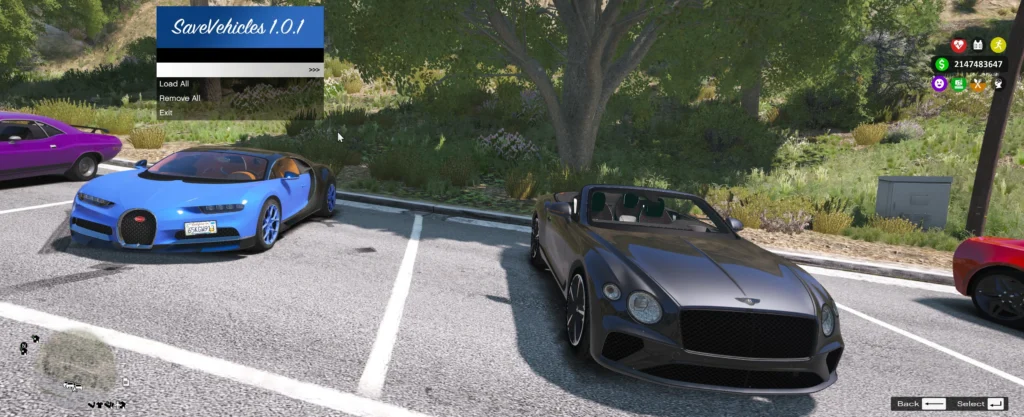


for GTA V Single Player allows players to save, load, and manage their in-game vehicles permanently. With this mod, you can easily store your favorite vehicles, reload them after game restarts, and even remove them when no longer needed. The mod also features an in-game menu that simplifies managing saved vehicles, offering an easy interface for adding, removing, and loading vehicles directly from the game.
Requirements:
LemonUI
Script Hook V
Script Hook V. Net
Installation:
Download all the requirements
Download the mod
Extract files to the script folder
Launch GTA V
How to use:
Save Key: (Default: X)
Unsave Key: (Default: C)
Menu Key: (Default: T)
Vehicle Limit: Set your own limit for the maximum number of vehicles you can store (default is 5).
Persistence Path:
Configure the save path where your vehicle data will be stored.
Usage:
Saving a Vehicle:
Press the configured key (X by default) while in your vehicle to save it.
Loading Vehicles:
Open the menu (configured key, T by default), then choose “Load All Saved Vehicles.”
Deleting a Saved Vehicle:
Press C while in the vehicle you want to unsave, and it will be deleted.
Notes:
This mod is designed for single-player use.
Make sure you are running the correct version of GTA V and ScriptHookV.
Credits:
FlareXll
Download mod
| File | File size |
|---|---|
 Flare Vehicle Save
 | 829 KB |
![Type 10 Flare Gun [4K]](https://gta5mod.net/wp-content/uploads/2019/10/cc0682-GTA5-2016-08-02-08-27-53-56.jpg "Type 10 Flare Gun [4K]")