
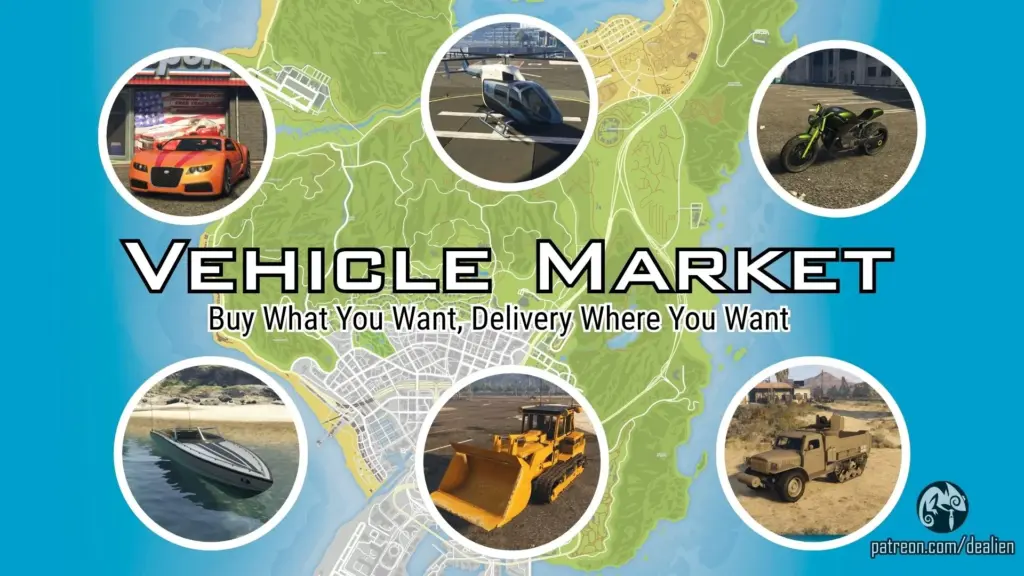


Vehicle Market brings a complete dealership system to GTA V, giving you access to the entire in-game vehicle catalog: cars, bikes, boats, helicopters, and even military hardware. Nothing is off-limits.
Access dealerships directly from your in-game phone and explore a dynamic, immersive vehicle purchasing experience with delivery straight to your chosen location.
Features:
📱 Phone-Controlled Access
Call a newly added contact on your phone to briefly reveal dealership locations on the map. Blips disappear after a few seconds (default: 12s, configurable).
🏪 Multiple Dealership Types
Different dealerships cover all vehicle categories: from civilian cars to high-end, armored, and weaponized vehicles.
📅 Dynamic Inventory System
Each dealership features a randomized vehicle selection that refreshes every 2 in-game days (optional).
🌙 Realistic Opening Hours
Dealerships operate between 07:00 and 21:00, adding immersion and realism.
🎨 Pre-Purchase Customization
Customize your vehicle’s color and plate before completing the purchase.
📦 Delivery System
Choose any point on the map and have your newly purchased vehicle delivered automatically.
⚙️ Fully Editable & Expandable
Modify prices, assign vehicles to dealerships, or add new models via a simple XML configuration.
Open the file “Dealien_VehicleMarket.xml” located in your scripts folder and edit as you like as long as the structure and dealers names are left as they are.
REQUIREMENTS AND HOW TO INSTALL:
🔻MAKE SURE YOU INSTALL THEM ALL🔻
Script Hook V
ScriptHookVDotNet3
iFruitAddon2 (recommended version: 3.0.1)
NativeUI
– A trainer to prevent online vehicles from despawning
(Recommended: Enhanced Native Trainer — no setup required)
Put the files from the downloaded archive into your “scripts” folder.
Disable BattlEye in your Rockstar Launcher or by adding the launch option -nobattleye
Remember after installing “ScriptHookVDotNet3” to change the settings of its config file “ScriptHookVDotNet.ini” in your main GTAV folder:
ScriptTimeoutThreshold=60000
If you need additional help take a look at this: 💡 How To Install Dealien’s Mods 💡
(Note: Video may be outdated but installation logic remains the same)
Credits:
Dealien
Download mod
| File | File size |
|---|---|
 VehicleMarket_v1.0_Public
 | 639 KB |
![Market Place [YAMP] 1.0](https://gta5mod.net/wp-content/uploads/2020/09/Market-Place-150x150.jpg "Market Place [YAMP] 1.0")
![Black Market Solider [.NET] [Controller Support] v1.1](https://gta5mod.net/wp-content/uploads/2021/12/Black-Market-Solider-150x150.webp "Black Market Solider [.NET] [Controller Support] v1.2")
![Hong Kong Central Market [FiveM/GTA5] V1.0](https://gta5mod.net/wp-content/uploads/2022/05/Hong-Kong-Central-Market-150x150.png "Hong Kong Central Market [FiveM/GTA5] V1.0")
