

I use Materialize to make textures for chains and models and got annoyed converting them on different websites and apps, so I decided to make this.
Simple desktop tool for converting textures into DirectX DDS on Windows.
How to use
Download the RAR file, extract it, then just launch the DDS Converter app. After that, you select your folders, pick your format, and hit convert.
What it does
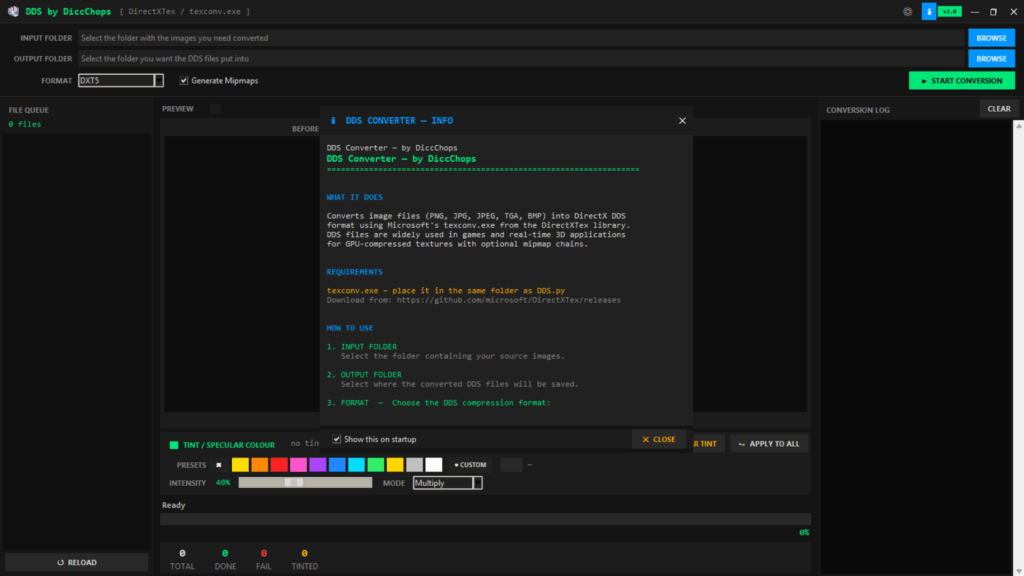
It is a lightweight Python app with a clean borderless UI that uses Microsoft texconv.exe from DirectXTex. Drop in a file or a folder, pick your format, hit convert – that is it.
Features
Batch convert a whole folder at once
Convert single files if you just need one
Supports 7 DDS formats: DXT1, DXT3, DXT5, BC4, BC5, BC7, RGBA
Optional mipmaps for in game use
Built in tint and specular editing
5 blend modes: Multiply, Screen, Overlay, Add, Lerp
Apply per file or to everything
Live preview with before and after side by side
Conversion log with timestamps
4 themes: Dark, Light, Matrix, DarkBlueGrey
Saves settings automatically
Supported input
PNG, JPG, JPEG, TGA, BMP
Output
DDS ready for FiveM, game engines, or 3D apps
Credits:
DiccChops
Download mod
| File | File size |
|---|---|
 Img To DDS
 | 35 MB |
![BMP-2M IFV [Add-On] 1.0](https://gta5mod.net/wp-content/uploads/2022/07/BMP-2M-IFV-150x150.jpg "BMP-2M IFV [Add-On] 1.0")
![BMP-1 IFV German Democratic Republic [Add-On] V1.0](https://gta5mod.net/wp-content/uploads/2023/03/BMP-1-IFV-German-Democratic-Republic-150x150.jpg "BMP-1 IFV German Democratic Republic [Add-On] V1.0")