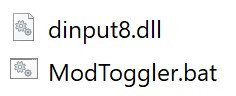
This simple batch file toggles Script Hook V on or off.
1. Place in your GTA V install folder.
2. Make sure that the path to your GTA V executable is correct (4th line).
3. IMPORTANT! First time use, you should have Script Hook V enabled before launching this bat!
4. Optional: Make a Shortcut of this bat file to your desktop.
5. Optional: Change the icon for the Shortcut to your liking.
When you use this to launch GTA V you will never forget to turn mods on or off, depending on if you play campaign or online.
Thank you for Matt281 for the inspiration.
Changelog:
version 0.1 – created the tool
version 0.1.1 – minor fix: added pauses to error messages
version 0.1.2 – minor addition: added version history
– minor edit: Renaming table elements
version 0.2 – removed editing unnecessary files
– added check if enabled and disabled file has the same status
version 0.2.1 – support for ENB Series
Credits:
frogthroat
Download mod
| File | File size |
|---|---|
 ModToggler_v0.2.1
 | 2 KB |
![Enable and Disable Script Hook V [Batch files] 1.0](https://gta5mod.net/wp-content/uploads/2019/08/Enable-and-Disable-Script-Hook-V.jpg "Enable and Disable Script Hook V [Batch files] 1.0")
![[Batch script] Lightweight Mod Switcher v1.5.1](https://gta5mod.net/wp-content/uploads/2019/08/Lightweight-Mod-Switcher.png "[Batch script] Lightweight Mod Switcher v1.5.1")