This tool was made for GTA V modders who work with MLOs in 3ds Max.
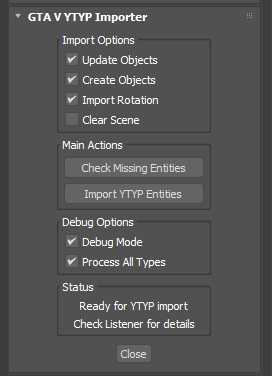
With it you can import YTYP Entities directly into 3ds Max and have all the props automatically snap into their correct positions/rotation. No more manual alignment or guesswork.
## Features
– Import YTYP files directly into 3ds Max
– Automatically place props in their original coordinates
– Works with interiors, props, and MLO structures
– Fast and simple workflow for modders
## How to Use
– Use CodeWalker or OpenIV to extract YDRs, YBNs, Textures, etc.
– You can use Ook3D’s Tutorial to extract all interior props
Tutorial
## Import models
– Bring all extracted models into 3ds Max using GIMS Evo “Import Them”
– Import your YTYP by clicking “Import YTYP Entities”
– Run this tool inside 3ds Max.
– Load your YTYP file and everything will be placed exactly in position.
That’s it, your full interior is now ready inside 3ds Max!
## Installation
– Place the script file (.mse) into your 3ds Max Scripts/Startup folder.
– Example:
“C:\Program Files\Autodesk\3ds Max 2025\scripts\Startup”
– Restart 3ds Max.
– You will now find the GTAV YTYP Importer under the Utilities tab.
## Requirements
– 3Ds Max (2016 or newer recommended)
– GIMS Evo
Credits:
EscobarV
Inspired by Rockstar’s GTA V extension system & Sollumz Tools for Blender.
Download mod
| File | File size |
|---|---|
 Esco_GTAV_YtypImporter
 | 27 KB |
![YTYP Generator [ODRS] 2.0](https://gta5mod.net/wp-content/uploads/2019/08/YTYP-Generator.png "YTYP Generator [ODRS] 2.0")