![Spawn [ SP / FiveM ] 1.0](https://gta5mod.net/wp-content/uploads/2020/08/Spawn.jpg)
![Spawn [ SP / FiveM ] 1.0](https://gta5mod.net/wp-content/uploads/2020/08/Spawn2.jpg)
![Spawn [ SP / FiveM ] 1.0](https://gta5mod.net/wp-content/uploads/2020/08/Spawn3.jpg)
![Spawn [ SP / FiveM ] 1.0](https://gta5mod.net/wp-content/uploads/2020/08/Spawn4.jpg)
![Spawn [ SP / FiveM ] 1.0](https://gta5mod.net/wp-content/uploads/2020/08/Spawn5.jpg)
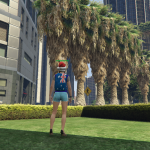
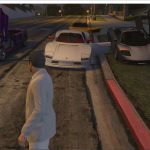
Simple delimited area against vehicles. Can be used as a spawn, office or for meeting.
FiveM Installation
1) Download the file.
2) Pull out the folder and paste it into the server.
3) Type “start spawn” in “server.cfg”.
Singleplayer Installation
1 ) Extract the YMAP from the folder and set it on your desktop.
2 ) Open OpenIV, install it if you dont have it already.
3 ) Click update> x64> dlcpacks> custom_maps>dlc.rpf> x64> levels> gta5> citye> maps> custom_maps.rpf
4 ) Then take the YMAP and drag & drop it into OpenIV then its in.
Credits:
Prcinka
Download mod
| File | File size |
|---|---|
 spawn
spawn | 22 KB |