
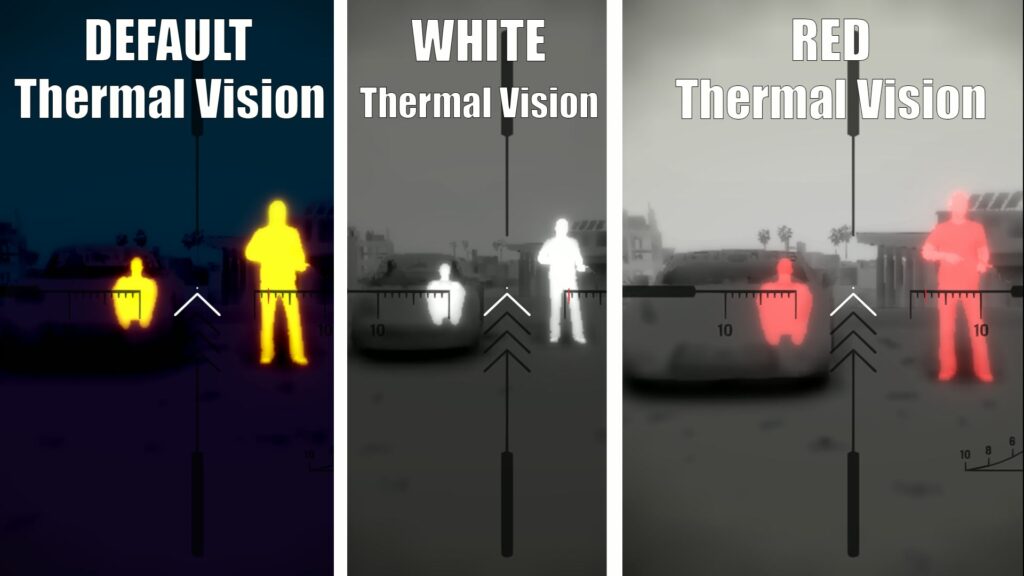
This mod changes the color of Thermal Vision to a more comfortable one (Default/Red/White)
Automatic installation:
1. Open any of the files using OpenIV
2. When installing or deleting, select the mods folder
3. Ready!
Manual installation:
1. Open OpenIV
2. Follow the path > Grand Theft Auto V/mods/update/update.rpf/common/data
3. Enable editing
4. Drag and Drop the file > visualsettings.dat (Default/Red/White)
5. Close OpenIV
Changelog:
> 1.1 Support GTA 5 Enhanced
Credits:
Feniksov
Download mod
| File | File size |
|---|---|
 CustomThermalVision
 | 3 MB |
|
Custom Thermal Vision Enhanced | 3 MB |
![Toggle Night/Thermal Vision (+ scope-only mode) [LUA] 1.3.3](https://gta5mod.net/wp-content/uploads/2019/12/0de5ac-aa8cb3-Untitled-1-150x150.jpg "Toggle Night/Thermal Vision (+ scope-only mode) [LUA] 1.3.3")
![Wearable Control (working night/thermal vision & more) [.Net] V2.0](https://gta5mod.net/wp-content/uploads/2023/08/Wearable-Control-150x150.png "Wearable Control (working night/thermal vision & more) [.Net] V2.2")
![2025 Lamborghini Urus SE [Add-On|Legacy|Enhanced] Legacy / Enhanced Versions](https://gta5mod.net/wp-content/uploads/2026/01/2025-Lamborghini-Urus-SE-150x150.webp "2025 Lamborghini Urus SE [Add-On|Legacy|Enhanced] Legacy / Enhanced Versions")
![Cyberpunk Katana [Thermal ColorPack] 1.0](https://gta5mod.net/wp-content/uploads/2021/09/Cyberpunk-Katana-150x150.png "Cyberpunk Katana [Thermal ColorPack] 1.0")
