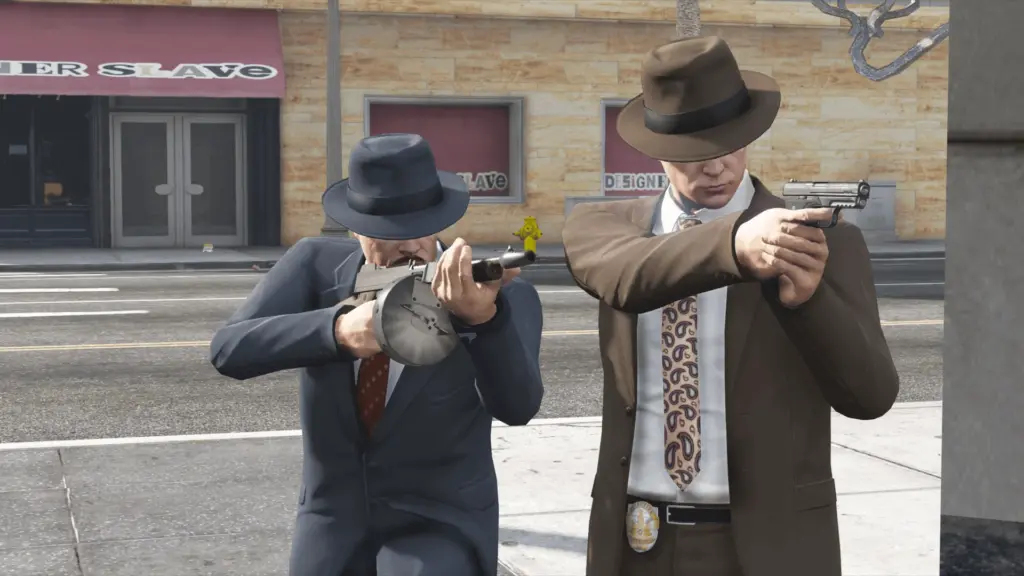


This mod brings a visual and structural rework to the vanilla Fedora hat in GTA V. This new reworked version features a more accurate 3D model and 7 realistic textures variations to match the authentic, sharp classic style of the 1940s and 1950s.
## File Contents
Inside this package, you will find som images and the main files:
– `p_head_012.ydd` (3D Model)
– `p_head_diff_012_a.ytd` to `p_head_diff_012_g.ytd`(Texture Dictionary)
## Installation
You can use this mod in three different ways depending on your setup:
### OPTION 1: GTA V Single Player (Replace Method)
Requires OpenIV installed and a configured “mods” folder.
1. Open OpenIV and turn on Edit Mode.
2. Navigate to the path of the clothing/prop you want to replace.
(Recommended path for hats: `mods\x64v.rpf\models\cdimages\streamedpedprops.rpf\` or your preferred patchday).
3. Rename my files to match the name of the vanilla hat you wish to replace.
4. Drag and drop the `.ydd` and `.ytd` files into OpenIV.
### OPTION 2: GTA V Single Player (Add-On Method)
Requires an Add-On Props/Clothing manager script installed.
1. Drag and drop the files into your custom add-on props folder using OpenIV.
2. Use a trainer (like Menyoo) to search for the custom prop name in-game.
### OPTION 3: FiveM Server (Streaming)
1. Create a new resource folder in your server files (e.g., `[assets]/classic_fedora`).
2. Inside that folder, create a `stream` folder and place the `.ydd` and `.ytd` files there.
3. Create a standard `fxmanifest.lua` file in the root of the resource folder.
4. Ensure/start the resource in your `server.cfg`.
Credits:
RAFIKI_50
Download mod
| File | File size |
|---|---|
 Fedora_Reworked
 | 39 MB |


![[YMAP] Rework - East Joshua Road Gas Station 1.1.0](https://gta5mod.net/wp-content/uploads/2020/08/East-Joshua-Road-Gas-Station-150x150.jpg "[YMAP] Rework - East Joshua Road Gas Station 1.1.0")