![Immersive Blink FX [SP/FiveM] V1.0](https://gta5mod.net/wp-content/uploads/2024/10/ImmersiveBlinkFX.webp)
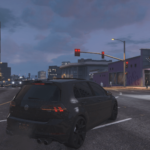
The ImmersiveBlinkFX mod for GTA V adds subtle visual effects to your screen in Grand Theft Auto V (GTA V) that mimic the blinking effect seen when closing and opening your eyes. This enhances immersion and creates a more natural experience when playing..
Features:
Blinking Effect Simulation: Adds a realistic eye-blink effect at configurable intervals, creating moments of subtle blackouts as if your character is blinking.
Dynamic Blink Timing: The blink frequency and duration can be adjusted to match different situations or preferences.
Installation:
SinglePlayer:
Download the mod: Download the provided `.dll` file.
Install Script Hook V:
If you don’t have it installed, download and install Script Hook V.
Follow the instructions for installing Script Hook V.
Install Script Hook V .NET:
Download and install Script Hook V .NET.
Ensure the ScriptHookVDotNet.asi, ini and dll files are in your GTA V root folder.
Place the Script: Place the ImmersiveBlinkFX.dll file in the scripts folder located in your GTA V directory. If the folder doesn’t exist, create it.
Launch the game: Start GTA V, and the mod will automatically apply its functionality.
FiveM:
Place the Script: Place the ImmersiveBlinkFX folder in the resource folder located in your FiveM server directory.
Add to cfg: Add ensure or start ImmersiveBlinkFX in your server.cfg located in your FiveM server directory.
Launch the game: Start GTA V, and the mod will automatically apply its functionality.
Changelog:
V1.3.0 Enhancements & Bug Fixes
- Added immersive water effects an overlay now appears when the player is swimming, enhancing underwater visuals.
- Introduced dynamic weather effects subtle mist appears on-screen in cold weather for added realism.
- Added faster blinking when running enables dynamic blinks that adjust to player activity for a more responsive experience.
- Configurable settings for running blink intervals running blinks are faster by default. When the player stops running, either the standard BlinkInterval or a random interval is applied based on your settings.
- Fixed blink bug where the screen would briefly go fully black and display a loading icon. (Please report if this issue persists.)
V1.2.0 (Requested by JoyLucien on GTA5Mods)
- Customizable Random Blinks Introduced a configurable boolean setting in the INI file to toggle the ‘EnableRandomBlinks’ feature, allowing users to customize the interval between blinks. This feature generates a random duration within the range defined by RandomBlinkMin (in milliseconds) and RandomBlinkMax (up to 10,000 milliseconds).
- Removed redundant code Streamlined the codebase by removing redundant segments, addressing minor stuttering issues encountered during gameplay.
- FiveM Version The FiveM version has been completely rewritten in LUA, enhancing clarity and reliability. Initially crafted in C#, the script transitioned to LUA due to persistent errors and a stronger familiarity with the latter language.
NOTE: If updating to V1.2.0 we recommend deleting previous version files.
V1.1.0
Customizable Blink Duration You can now customize the time it takes for the screen to fade out and fade in (blink duration) by editing the ImmersiveBlinkFX.ini file in the script directory.
Periphery-to-Center Effect I’ve added a new periphery-to-center effect when blinking, which simulates the screen going black from the edges towards the center during the blink.
Renamed DLL FiveM Renamed FiveM dll from ImmersiveBlinkFX.net.dll to ImmersiveBlinkFX.Client.dll.
Credits:
Code Master
Download mod
| File | File size |
|---|---|
 ImmersiveBlinkFX V1.3
 | 469 KB |
|
Immersive Blink FX V1.2 | 267 MB |
|
Immersive Blink FX V1.1 | 267 MB |
|
Immersive Blink FX | 313 KB |