
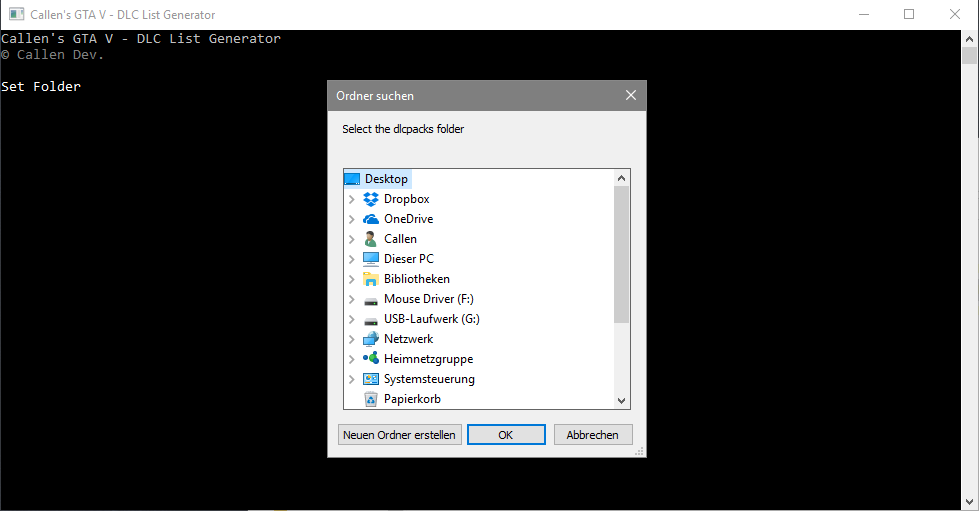
There’a a video on how to use this if you don’t know how to or have never used it before, it’s pretty straight forward
Also many thanks to Guad, LeeC2202, and YeahhMonkey all of which helped me at various stages of the way, I couldn’t have done it without you
Please make sure directory is correct before reporting a bug… Thanks
–Build 1.4 –Build [STABLE] 1.3 –Build [STABLE] 1.2 –Build [STABLE] 1.1 –Build [BETA] 1.0 –Build [BETA] 0.95 –Build [BETA] 0.9Changelog:
–Build 2.0
– Got bored so decided to finish it off, complete ini file before running it –
– Copy to clipboard
-The game path must be set to where gta5.exe is located , not dlcpacks folder
– No need for any external files, but exe must be placed in the same folder as your dlcpacks (update/x64/dlcpacks)
– Added what seems like support for older versions of Window, tested on my laptop (Win7 – target fw 452 and it works but I’m not sure on other versions, I’ve mixed both versions so old one is included in same exe
– Writes names to log file, but not yet formatted correctly, I’m working on it :p
– Added support for latest DLC (patchday13)
-Error message if directory doesn’t exist
-Added new colors
– Fixed connection of strings error resulting in unexpected indents
– Added Open Source Code and added new OpenSource ReadMe file inside
– Added support for dlcpacks in folder x64w
– Fixed Meta Line in dlclist.xml
– Initial Release
Credits:
frazzlee
Download mod
| File | File size |
|---|---|
 DLC_List
 | 4 KB |

![SimpleMenu - Single Player Mod Menu [Open Source] 1.0](https://gta5mod.net/wp-content/uploads/2025/07/SimpleMenu-Single-Player-Mod-Menu-150x150.webp "SimpleMenu - Single Player Mod Menu [Open Source] V1.2")
