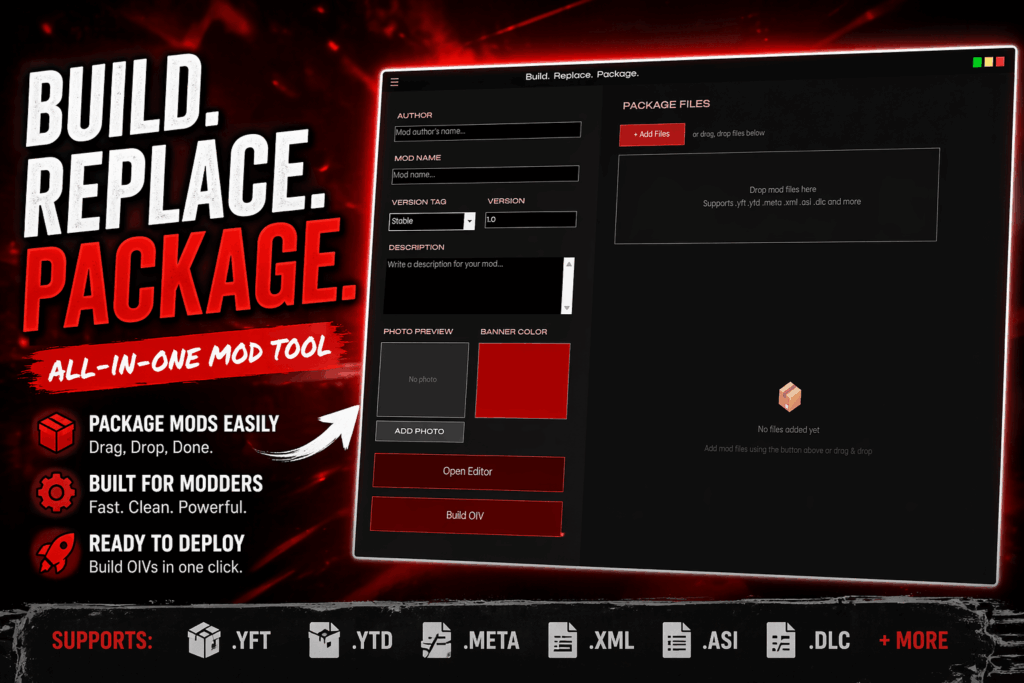


I recently built this tool to solve a problem I kept running into: most existing OIV creators are outdated, clunky, or overly complicated—especially when working with larger modpacks.
MagicOGK OIV Builder is designed to make creating .oiv packages for OpenIV fast, clean, and hassle-free.
Key Features
– Easy DLC Pack Integration
– Quickly add full dlcpacks without manual setup
– Automatic dlclist.xml Editing
– No more forgetting entries—handled for you
– Drag & Drop File Management
– Build your package structure visually
– Clean, Modern UI
– Built for usability, not frustration
– Project-Based Workflow
– Save, load, and edit your OIV projects anytime
– Support for Replace & Add-On Mods
– Works for vehicles, textures, clothing, and more..
Will be updating as we go..
Changelog:
Version 1.6.2
Added
• Automatic XML patching support for files such as content.xml and dlclist.xml.
• Support for replacing entire .rpf archives during installation.
• Support for deleting files from .rpf archives.
Fixed
• Fixed an issue where some mods required manual content.xml or dlclist.xml registration after installation.
• Fixed installer failures when performing whole archive (.rpf) replacements.
• Fixed handling of XML-based installer actions that were previously treated as unsupported.
Improved
• Expanded compatibility with more OpenIV/OIV package formats.
• Improved installer reliability for complex mod packages.
• Enhanced installation logging and operation tracking.
Optimization
• Added automatic content.xml registration for update.rpf archives.
• Added support for Delete operations in the File Editor and OIV builder.
• Fixed build errors when creating uninstallers using Delete entries.
• Improved assembly.xml generation for nested RPF archives.
• Added automatic XML patch generation for content.xml registration.
• Added remote preview image loading with local caching.
• Reduced installer size significantly by moving preview assets outside of the packaged application.
• Various stability improvements and bug fixes.
Version 1.6.1
Shoutout user JoyLucien who actually did these updates.
Update from .NET 8 to .NET 9
Refactor control properties into standard properties with change notifications.
Add a CornerRadius property with a default value to AnimatedGlowPanel.
Add TransparentIdle and CornerRadius properties to AnimatedGlowButton.
Refactor the SelectedIndex property in CustomDropdown and improve the PlaceholderText configuration.
Version 1.6
UI-overhaul – animated/interactive glow to buttons/ to some selectable areas. Custom textboxes, scrollbars, drop down menus, and custom progressbars and pop-up boxes.
Rebuilt logic for building and unpacking .oiv files.
Added a button to check for updates.
Added “New Project” and “Quick Save” buttons to sidebar.
Experimental OIV installer support: A function to install OIV-Files directly from within the application. (Credits to CodeWalkerCoreFX & CodeWalker – Used project as reference for this function -Contact me on Discord if you want this removed).
Experimental OIV installer support (follow up): Added some safetymeasures with backing up .rpf files before writing – user cannot install .oiv’s if GTA5 or OpenIV is running to avoid corruption. And added necessary keys for .rpf encryprion.
Added uninstall function for .oiv files installed with the application, and a auto-detect game directory function.
Version 1.5
Added the option to extract existing OIV files into folders, with the option to extract as a flat archive or a nested archive.
Also changed to non-single file when building the solution. This helped a tiny bit on the archive size for the program.
And packed it all into a single installer for ease of installation.
Version 1.4
Added some changes to UI in replace install menu.
Added ped replace install menu.
Version 1.3
Added clothes replace menu, and weapons replace menu, Added OIV-disassembler function -updated to work properly with pathing each file. (Might be a bug disassembling .oiv’s built with this program) Updated UI – Added Link feature in metadata tab.
Credits:
MagicOG
Download mod
| File | File size |
|---|---|
 MagicOGK-OIV-Builder-Setup-1.6.2
 | 38 MB |

![Skysder's Enhanced Traffic Experience: Ultimate Edition [OIV] 1.0 Hotfix](https://gta5mod.net/wp-content/uploads/2022/06/Enhanced-Traffic-Experience-150x150.jpg "Skysder's Enhanced Traffic Experience: Ultimate Edition [OIV] 1.0 Hotfix")