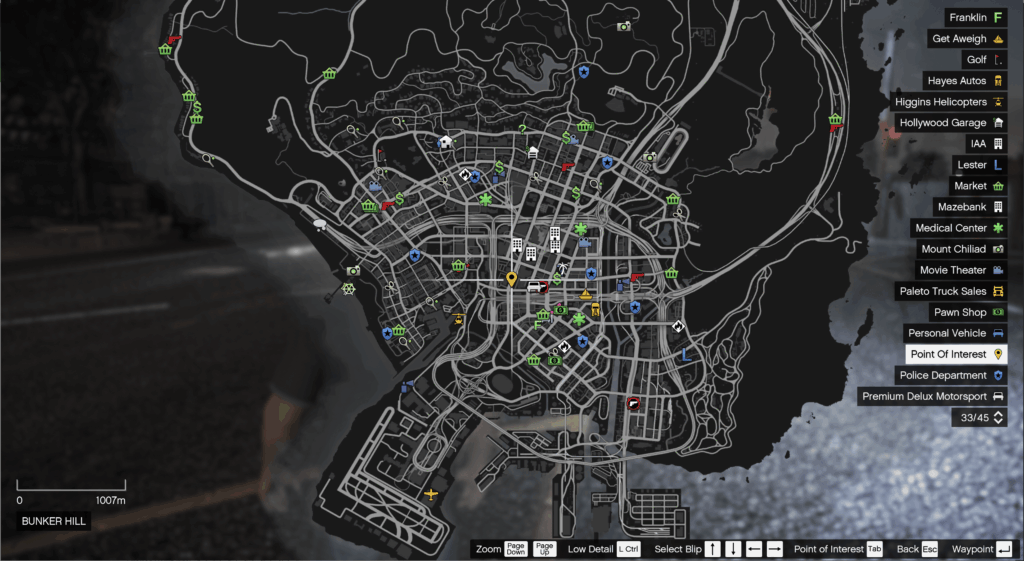


A very simple, lightweight, and advance script that make you add blips as you like, with various options to add to your blip this includes: Name of the blip, blip icon/texture, blip size, blip color, flashing state, flashing interval, short range state, and coordinates.
Explanation of ini sections:
• Blip Name: Name of the blip. Example: Clucking Bell Farms
• Blip Icon: Blip icon/texture (see reference links below). Example: 273
• Blip Size: Scale multiplier (1.0 = default). Example: 0.8
• Blip Color: Color of the blip (-1 for default, see reference links below). Example: 1
• Flashing State: Enable/disable blinking effect for the blip. Example: OFF
• Flash Interval: Flash speed in Milliseconds (higher = slower). Example: 1500
• Short Range State: Best Explained in image. Example: OFF
• X: The “X” coordinate of the blip. Example: -80.4800
• Y: The “Y” coordinate of the blip. Example: 6243.0698
• Z: The “Z” coordinate of the blip. Example: 66.8366
IMPORTANT NOTES!!!
USE “.” (DOT) FOR DECIMAL NUMBERS AND DO NOT USE “,” (COMMA), FLASH INTERVAL WILL BE IGNORED IF THE FLASHING STATE IS SET TO OFF
Reference Links:
Refer to this website (ColorID) to know the color ID that will be used in “Blip Color” section if you plan to use it.
Also refer to this website (BlipsIcons) to know the blip icon ID that will be used in “Blip Icon” section.
To get the X,Y, and Z coordinates of the location you want to add the blip into press “F1” key and the coordinates will be displayed.
2. Features
– Simple to use
– Various parameters to edit
3. Requirements
GTAV
ScriptHookV
ScriptHookVdotnetnightlyversion
.NET Framework 4.8
4. Installation
Ensure that Script Hook V, Script Hook V dot net nightly version, and .NET Framework 4.8 are probably installed.
Extract all files into the “scripts” folder (create one if you do not have it) in your GTAV directory.
Add blips to the “Custom Blips.ini” file.
Launch GTAV and enjoyyy.
5. Mod conflict(s) and known Bug(s)
None until now, please report any bugs, issues, or mod conflicts and include “Custom Blips Log.txt” contents if the file exists in “scripts” folder to help improve this section.
6. FAQs
Q1. Got a Bug(s) and/or Mod conflict(s), how can I report it?
A1. Contact me directly through the mod page (officially on gta5mods website) and include “Custom Blips Log.txt” contents if the file exists in “scripts” folder.
Changelog:
v4.3.0 – Remember Blip Visibility
Added: The script now remembers if your custom blips were hidden or visible when you last closed the game, automatically applying your preferred visibility state on startup
v4.2.2 – Support for Enhanced Version of GTA V
Improved: The script is now compatible with GTA V Enhanced, thanks to FastBurst for testing and helping in bringing the support for it
v4.2.1 – Open Source Under GPLv2 License
Improved: Released the source code of the script under the GNU GPLv2 license on GitHub
Removed: Embedded Dependencies since it was found to cause issues
v4.2.0 – Embedded Dependencies & Improved Icons On-Screen
Added: 36 New blips! Now the script features over 930+ blips
Added: The ability to switch between vanilla texture sheet and modded texture sheet for the on-screen icons with persistence state between game sessions
Improved: Embedded LemonUI, INI File Parser, and Newtonsoft JSON directly into the mod — no separate installations required
Improved: Updated both fire departments and metro station blips icons
Fixed: Broken on-screen icons selection positions
v4.1.0 – Major Bug Fix & Improvements to Preview Blip
Added: Flash, Flash Interval, & Transparency effects for preview blip. It now shows exactly how the blip will look like before saving
Fixed: Script crashing at start-up
v4.0.2 – Patch for Update Checker
Fixed: Update checker function where it couldn’t parse current script version
v4.0.1 – Patch for Delete Button
Fixed: Delete button in edit blip menu where it caused the game to crash after deleting a blip
v4.0.0 – Robust & Optimized for Performance
Added: Automatic handling of the “Access Denied” error
Added: Full backward compatibility — existing INI files automatically migrate to JSON on first launch (a backup is saved as Advanced Custom Blips.ini.backup)
Added: Transparency field for blip properties, allowing control over how transparent a blip is
Added: Group field for blips to make them easier to manage in the “Manage Existing Blips” menu
Added: Ability to type icon/color names or IDs directly (not just scroll through lists in the “Add New Blip” and edit blip menus)
Added: Automatic and manual update checker
Added: Reset to Defaults button in the “Global Settings” menu that restores all options to their default values
Improved: Significantly improved the performance and smoothness of the script
Improved: Switched from INI to JSON format
Improved: Complete naming freedom — both blip and group names can now contain ANY characters (underscores, spaces, special symbols, empty names, whitespace — no more restrictions, thanks to JSON)
Improved: Clarified all script messages and item descriptions
Improved: From version 4.0.0 and beyond, the script follows Semantic Versioning
Improved: X, Y, and Z fields in the “Add New Blip” menu now behave as follows: Uses the provided coordinates if all are present and valid. Fills in only missing coordinates (X, Y, or Z) using the player’s current position. Falls back entirely to the player’s position if the provided coordinates are invalid. Stops execution if a valid player cannot be obtained.
Improved: Normalized both “.” (dot) and “,” (comma) as decimal separators — the script no longer differentiates between them; use whichever you prefer
Improved: Preview blip now updates its position with the player
Improved: Enhanced key assignment visuals in the “Global Settings” menu
Improved: Reworked the “Manage Existing Blips” menu — it now lists all groups first; each group contains its blips, and each blip includes its own edit menu
Improved: Support for decimal numbers in Add-On blips .txt files
Improved: Settings are now stored in a dedicated file called “Advanced Custom Blips Settings.json”
Fixed: Flash interval having no effect on blips
Fixed: Color mismatch for on-screen icons (Colors 6, 7, and 38)
Fixed: “Save Changes” button in the “Global Settings” menu incorrectly saving keys to the INI file, which disabled menu interactions
Fixed: Coordinates display system randomly stopping or not appearing at all
Fixed: Color field in the “Edit (blip name)” menu
Fixed: DirectoryNotFoundException error when loading Add-On blips if the directory does not exist
Fixed: 1–2 seconds of freezing when enabling or disabling category blips
Fixed: Custom blip names disappearing
Fixed: Disappearing vanilla blips when a large number of custom blips exist
Removed: Flash and flash interval effects from the preview blip
Removed: Saving actual names of blip icons/colors in INI files (not just IDs). JSON is stricter; manual editing will return in future updates
Removed: Teleport menu
v3.0 – Improved
Added: On-screen icons selection with preview of their color
Added: Support for “Addon Blips” txt files
Added: More blips
Improved: Upgraded to LemonUI menu
Fixed: flickering of the menu
Fixed: Blip name in edit “blip name” menu
Fixed: Mismatch between blip icon ID and blip icon name
v2.0 – Major Overhaul
Added: Full NativeUI in-game menu (add, edit, copy, delete, and teleport to custom blips)
Added: Real-time preview blip in front of player
Added: Configurable hotkeys (reload, toggle visibility, open menu, and show coordinates)
Added: Predefined locations of gas stations, fire departments, police departments, markets, medical centers, ATMs, and metro stations. Each category can be toggled on or off individually via the in-game NativeUI menu (all categories are toggled off by default)
Added: Save actual names of Blip Icons/Colors in INI (not just IDs). Useful for manual editing users
Improved: Error handling & coordinate display system
Credits:
Ali Osama
Rockstar Games for Grand Theft Auto V
Alexander blade for Script Hook V
Crosire for Script Hook V dot net nightly version
Download mod
| File | File size |
|---|---|
 AdvancedCustomBlips_v4.3.0
 | 1 MB |

![P-996 Lazer: Advanced Fighter [ REPLACE ] 1.0](https://gta5mod.net/wp-content/uploads/2019/11/P-996-Lazer.jpg "Lazer: Advanced Fighter 2.0 [Add-On] Custom Weapom")