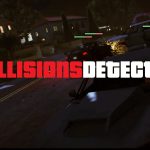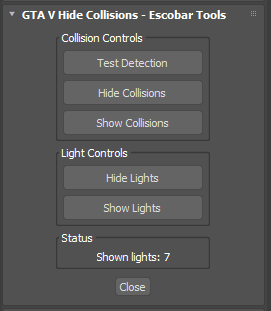
This 3ds Max script is designed specifically for GTA V Modders to streamline the workflow when working with collisions and lights inside MLOs
With a single click the tool automatically detects and hides all collision meshes and lights; helping you work on your scene without unnecessary clutter. It supports both object names and modifiers making it reliable across different setups.
Features:
– Instantly hide common collision objects (Box, Sphere, Capsule, Cylinder, Plane, Disc, etc.)
– Supports GTA V specific collision class names:
EGIMS_V_CollisionMesh
EGIMS_V_Col_PrimBox
EGIMS_V_Col_PrimSphere
EGIMS_V_Col_PrimCapsule
EGIMS_V_Col_PrimCylinder
EGIMS_V_Col_Disc
EGIMS_V_Col_Sphere
EGIMS_V_Col_Cylinder
EGIMS_V_Col_Plane
EGIMS_V_Col_Box
EGIMS_V_Col_Capsule
– Hides lights to keep your viewport clean also support Gims Evo Lights + Default 3DsMax Lights.
– Easy to access from the Utility Panel in 3ds Max.
Perfect for MLOs Creators/Developers who want a faster and cleaner workflow inside 3ds Max
Credits:
Escobar
Download mod
| File | File size |
|---|---|
 Esco_GTAV_Hidecollisions
 | 11 KB |
![US Plateholder for Vehicle Mods [.obj .3ds .dae] 1.1](https://gta5mod.net/wp-content/uploads/2019/09/US-Plateholder-for-Vehicle-Mods.jpg "US Plateholder for Vehicle Mods [.obj .3ds .dae] 1.1")