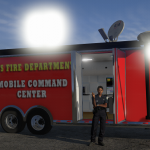
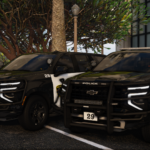
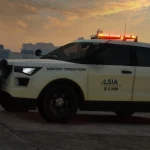
![[NON-ELS/DLS/DLC-Add On] LSIA Police (AC) Pack V1.0](https://gta5mod.net/wp-content/uploads/2025/10/LSIA-Police3-1024x576.png)
![[NON-ELS/DLS/DLC-Add On] LSIA Police (AC) Pack V1.0](https://gta5mod.net/wp-content/uploads/2025/10/LSIA-Police.png)
![[NON-ELS/DLS/DLC-Add On] LSIA Police (AC) Pack V1.0](https://gta5mod.net/wp-content/uploads/2025/10/LSIA-Police2.png)
![[NON-ELS/DLS/DLC-Add On] LSIA Police (AC) Pack V1.0](https://gta5mod.net/wp-content/uploads/2025/10/LSIA-Police4.png)
![[NON-ELS/DLS/DLC-Add On] LSIA Police (AC) Pack V1.0](https://gta5mod.net/wp-content/uploads/2025/10/LSIA-Police5.png)
![[NON-ELS/DLS/DLC-Add On] LSIA Police (AC) Pack V1.0](https://gta5mod.net/wp-content/uploads/2025/10/LSIA-Police6.png)
One of the busiest airports in the world, with nowhere near enough infrastructure to support it, Los Santos International brings third-world service to first-world travel. To add to the third-world service, an overfunded police department with way too little action makes for an exciting or frustrating time as a traveler going through LSIA, with an almost guaranteed interaction one way or the other with the LSIAPD. And don’t worry about your parked car, the airport traffic service officers will gladly issue a parking citation to meet their steadily increasing quotas to fund the airport operations.
A lore-friendly Los Santos Int’l Airport Police pack, entirely fictional with inspiration taken from the Anchorage Ted Stevens Airport Police’s new decals for the livery.
The pack includes the following vehicles:
alsiapdeve = LSIAPD Traffic Everon
alsiapdnal = LSIAPD Alamo 2
alsiapdnau = LSIAPD Alamo 2 Unmarked K9
alsiapdsct = LSIAPD Scout II
alsiapdscu = LSIAPD Scout II Unmarked
Installation instructions for DLC add-on:
1. Launch OpenIV, enable edit mode
2. Copy the “alsiapd” folder to the following path: “mods/update/x64/dlcpacks”
3. Navigate to: “mods/update/update.rpf/common/data” and add “<Item>dlcpacks:/alsiapd/</Item>” at the bottom of “dlclist.xml”
but above “</Paths>”
4. Save and exit
OPTIONAL: DLS configuration installation instructions:
1. Copy the folder ‘plugins’ in the ‘OPTIONAL DLS Files’ folder
2. Navigate to your GTA V main directory
3. Paste the folder ‘plugins’
The Siren Setting Limit Adjuster is required to stop sirenSetting conflicts with other packs!
The Gameconfig is required to support multiple addon vehicles, otherwise your game may crash!
The Dynamic Lighting System is recommended to be able to use non-ELS stage lights.
Credits:
Crizby
Download mod
| File | File size |
|---|---|
 Los Santos Intl Airport Police Dept AC Pack 1.0
 | 34 MB |
![2017 Ford F450 SuperDuty Single Cab Ambulance [FiveM] [NonELS] 1.00.a non els](https://gta5mod.net/wp-content/uploads/2019/10/2017-Ford-F450.jpg "2017 Ford F450 SuperDuty Single Cab Ambulance [FiveM] [NonELS] 1.00.a non els")